

Pinpal Jobs
Everything you send to clients, in one place.
Your quotes, contracts and invoices per client, with where each one stands. Quote it, do it, invoice it. And when you want, the AI you already use drafts and sends them for you.
Free for up to 20 documents. A monthly subscription for unlimited. First week free.
Works withClaudeChatGPTand any AI with MCP
To Claude
Quote Café Pascal for the brand refresh, like last time. Put it in my Pinpal.
Who it is for
For a small business. About ten clients a year.
You run a studio, a workshop or a one-person company. A quote, a contract and an invoice per client, maybe ten clients a year. An accounting system is too much for that, and a folder of Word files does not tell you who still owes you. Pinpal Jobs keeps every client and where each document stands: draft, sent, accepted, signed, paid or overdue.
Not here: bookkeeping, payroll, a chart of accounts, legal text written for you.
The app
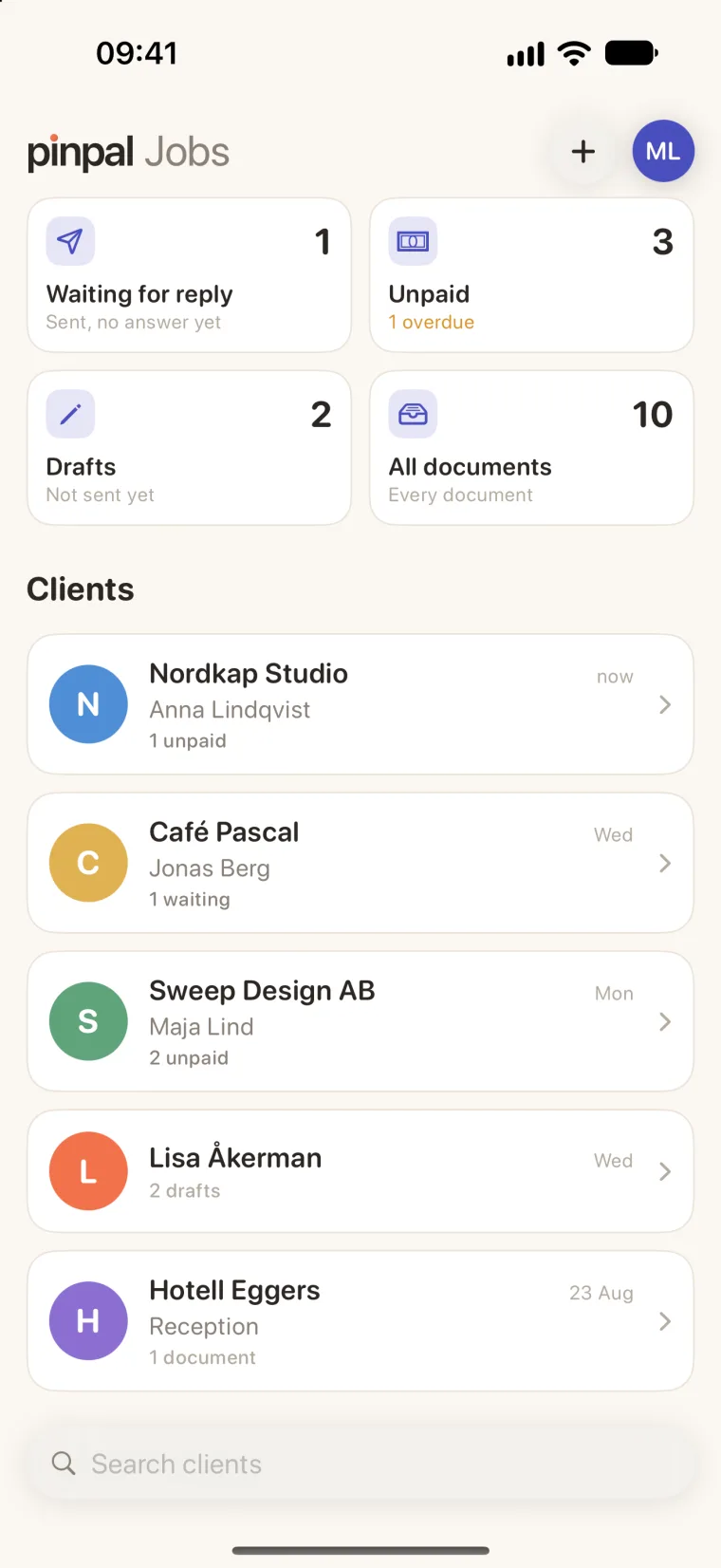
Every client, where it stands.
Your clients, the most recent first, and under each one its quotes, contracts and invoices. One tap shows what is waiting for an answer, what is unpaid and what is still a draft.
The documents
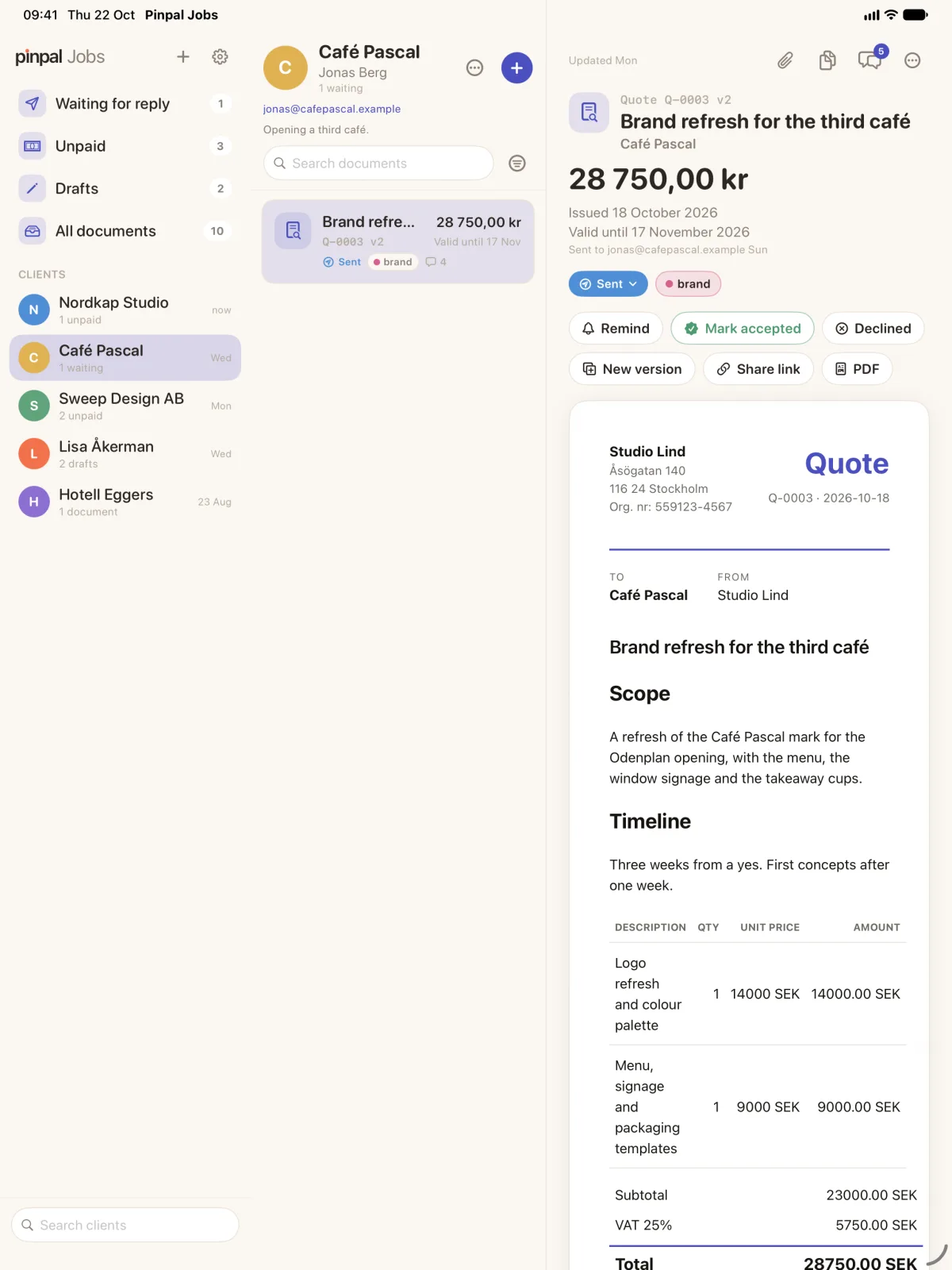
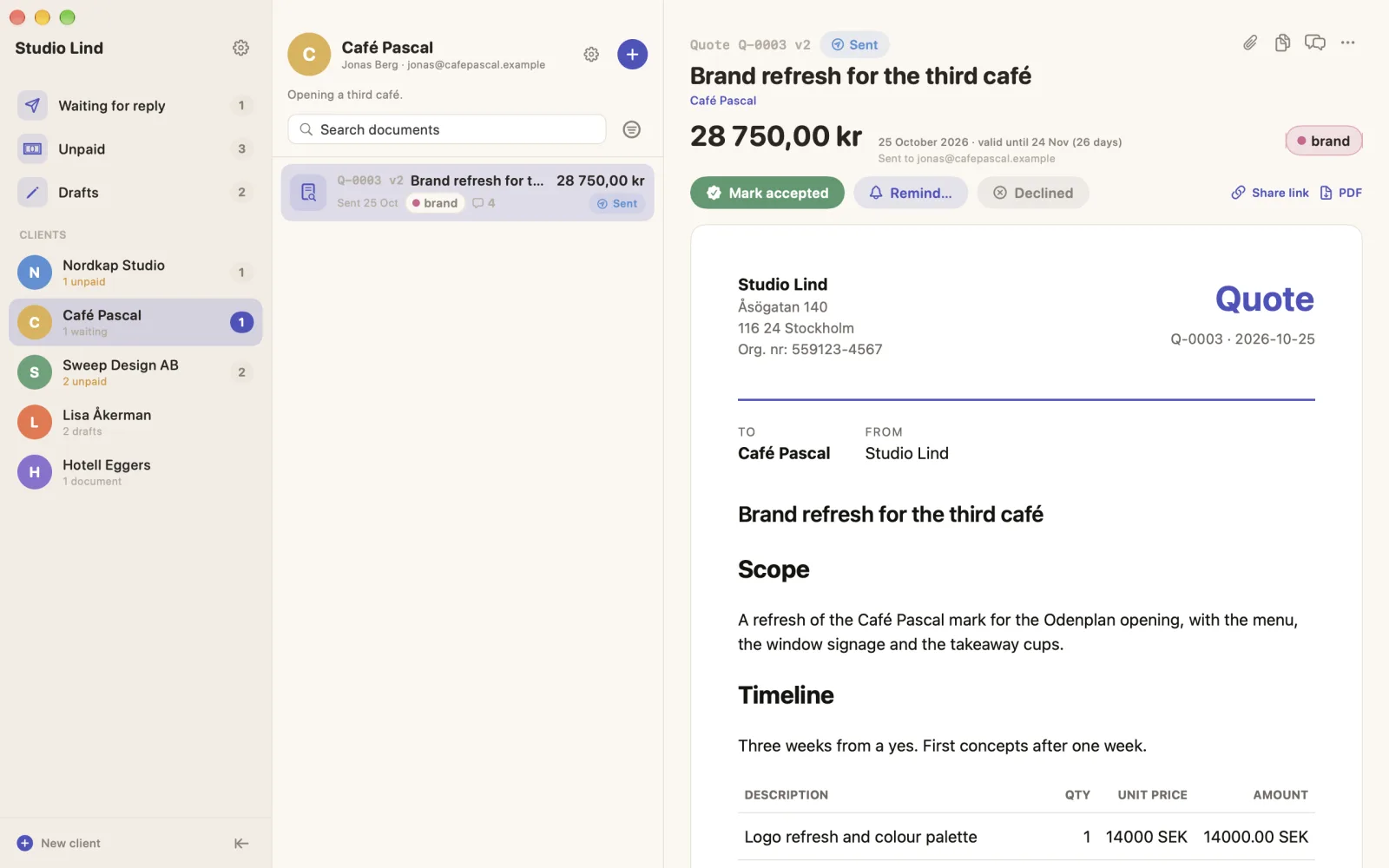
Documents that look good. One link for your client.
Lines with quantity and price, tax lines with your own label and rate, any currency. Your logo on every page. The first send takes the next number in your series and locks the document, so what you sent is the record. A quote or a contract gets a new version instead; an invoice stays as sent.
Your client reads the document on a clean page, downloads the PDF, and accepts the quote or approves the contract with one click. You see it in the document's thread. Send by email from the app with the PDF attached, and send a reminder when an invoice is late. Nothing is ever sent unless you ask.
If you want
And your AI drafts and sends.
You sayIt drafts, you send.
“Quote Café Pascal for the brand refresh, like last time.” The draft is waiting in the app.
You askIt follows up.
“Which invoices are overdue? Send a friendly reminder.” It writes in the thread what it did.
You sayIt works your way.
“Make our documents green, with the headline in Swedish.” Your numbering, your labels, your look, set in a sentence.
It neverIt never deletes.
Not a client, not a document, not a comment. And nothing goes to a client unless you ask.
Connect your AI
Works with the AI you already use.
Claude, ChatGPT or any AI that supports connectors (MCP). Paste one address and sign in. Pinpal Jobs works fully without AI too: the app has the same forms.
Works withClaudeChatGPTand any AI with MCP
Pinpal Jobs connector address
https://jobs.mypinpal.com/mcpPaste this address into Claude, ChatGPT or any AI with MCP, and sign in with Apple or Google. Step by step · API and MCP reference
Price
Free to start. Unlimited when you need it.
Freefor up to 20 documents
A monthly subscription for unlimited. First week free.
- The App Store shows the price in your currency before you subscribe.
- Reading, editing and deleting are always free. Delete a document you no longer need to make room.
- No ads. Your AI connects on the free plan too.
- Cancel any time in Settings. Stop paying and your documents stay readable and exportable.
Questions
Short answers.
Is this accounting software?
No. Pinpal Jobs keeps what you send to clients and where each one stands. It does no bookkeeping. Your accountant still gets the invoices, as PDFs.
Does it write the legal text for me?
No. Pinpal Jobs writes no legal text and has no country's rules built in. Your company fields (a tax ID, a VAT or registration number, whatever you need), your terms and your footer are yours to write, in your words.
How does my client approve a quote?
Share the link, or send the document by email from the app. Your client opens a clean page with the PDF and approves with one click. You see the name and the time in the document's thread. It is an approval, not an e-signature.
Can I change an invoice after I sent it?
No. The first send numbers and locks it, so what you sent is the record. A correction is a new invoice. A quote or a contract gets a new version with the same number.
Is it free?
Yes, for up to 20 documents, with everything in it: clients, sending, share links, reminders and your AI connected. For more, a monthly subscription makes documents unlimited, and the first week is free.
What happens if I cancel?
Nothing is deleted. Every document stays readable, editable and sendable, and you keep up to 20 on the free plan.
When can I download it?
Pinpal Jobs is on its way to the App Store. The button on this page turns on the day it is live.
Coming soon. Quote it, invoice it.
Quotes, contracts and invoices for you and your AI, on iPhone, iPad and Mac.
A monthly subscription. First week free.